Gmail Notifier for KDE
 ail
ailStay on top of your inbox without opening it. A lightweight system tray notifier that alerts you when new Gmail messages arrive.
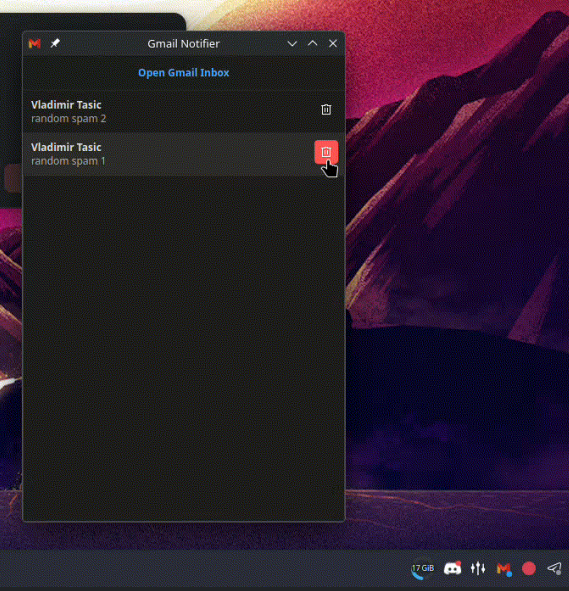
Stay on top of your inbox without opening it. A lightweight system tray notifier that alerts you when new Gmail messages arrive.
Gmail Notifier sits in your KDE system tray and checks for new messages on a schedule. When something arrives, you get a desktop notification. Click the tray icon to browse recent emails, open them in your browser, or delete them -- all without launching a full email client.
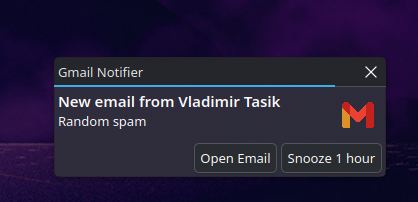
Dual system: tray popups and notify-send alerts with an action button to open Gmail directly.
Single-click the tray icon to see your latest unread emails. Click to open, trash to delete.
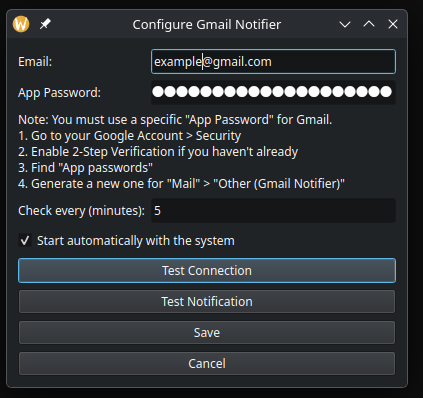
Enter your email and app password, set the check interval, and you're done. Password stored in system keyring.
Tray icon popups and system notifications via notify-send
Browse recent unread messages with one click
Open specific email threads in your browser
Move emails to trash directly from the popup
Silence notifications for 1 hour with a visual "Z" badge
App passwords stored in your system keyring
Set your preferred check frequency
Red dot for unread, orange for errors, blue for snooze
Prevents duplicate alerts, groups new emails into summaries
Minimal resources, runs quietly in the background
Launches with your KDE session via XDG autostart
Installs a .desktop launcher in your applications menu
Clone the repo, run the installer, enter your Gmail app password. That's it.
Found a bug? Open an issue